
How to round the corners of your Card Snippets
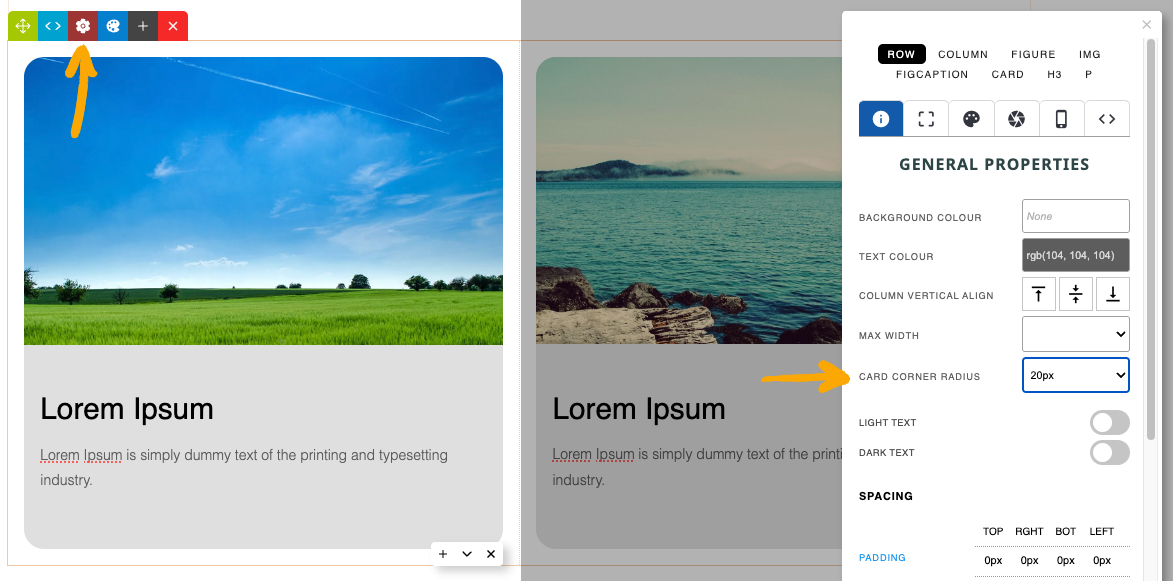
- Click the RED COG icon found in the Row Tools top-left of the snippet
- From the options that appear - choose an option from the CARD CORNER RADIUS dropdown.
More From This Section
You can quickly round the corners of your Card Snippets via the Style Editor popup.
You can quickly change the default background colours of the Cards via the Colour Palette Popup
You can vertically align the content of your Card Snippets via the Style Editor popup
You can add or remove drop shadows via the Style Editor Popup
You can use the Column Gap setting in the Style Editor to increase the spacing.
FAQ Topics
Building your site
Advanced Page Types
E-Commerce
- Shopping Basics
- Product Pricing, Currencies
- Category Management
- Products
- Product Options
- Layout and Formatting
- Payment Options
- Freight - Couriers
- Processing Orders
- Orders / Invoices
- Advanced Ecommerce
- Plugins
- Wholesale
- Bookings Management System
- Stock & Quantities
- Vouchers, Discounts, Loyalty Points
- Selling Photos / Prints
- Shopping Cart Add-on Page types
- Advanced APIs / Add ons
- Point of Sale (POS)
- Reports
Email & Membership
Promoting your site
Advanced
- Power User Options
- Form Spam Filtering
- Wordpress
- PHP Setup
- [TAGS]
- jQuery snippets
- Search External Links / Import external content
- HTML / CSS Snippets
- Embedding Web Fonts
- Loading additional Material Symbols styles
- FAQ Help Map
- Uploading local font files
- Advanced Template Customisation, CSS, etc
- Languages and Translations
- Importing Content from Another Platform
