

The experience a visitor has while on your website plays a significant role in how long they stay, how many pages they visit and what they do as a result of their visit. Breadcrumbs can help improve this UX or user experience, while also helping with your SEO. Today we'll discuss what breadcrumbs are exactly, the benefits of using them and how to add them to your website - plus we've got a video at the end to demonstrate adding breadcrumbs too!
What Are Website Breadcrumbs?
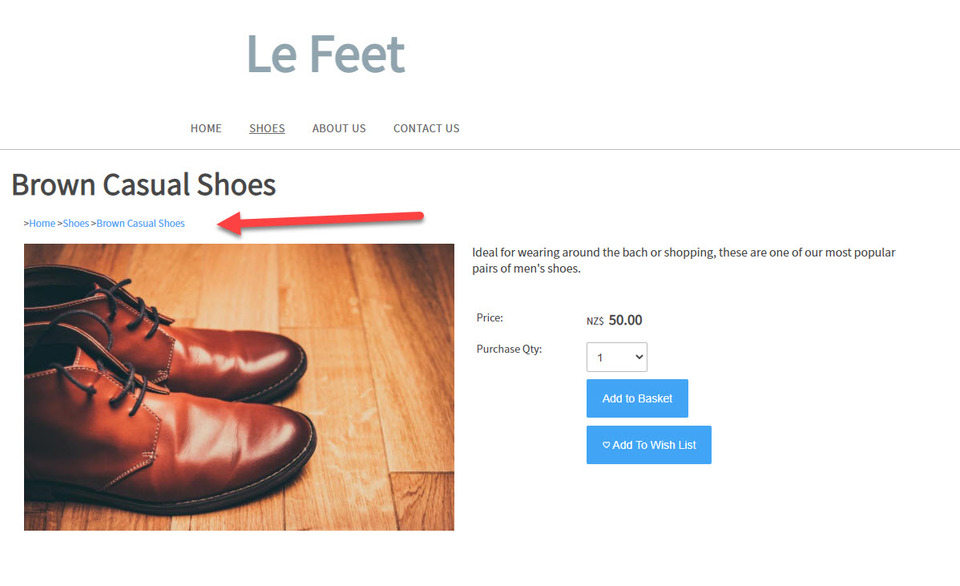
Breadcrumbs are a navigational aid for websites which are used by both visitors to your site and search engines. They help the visitor know where they are and/or where they've been, while helping Google know how your website is structured. Usually found near the top of a web page, they consist of a line of clickable text featuring the names of pages or categories within a site's organisation.
Like with Hansel and Gretel, breadcrumbs can show you whereabouts you are, plus where you've been and help you to go places you haven't been before. Breadcrumbs can also make it easier to find specific sections of a website and can help a visitor find a page or product which may suit their needs better.
There are three different types of breadcrumbs:
- Location or hierarchy based breadcrumbs - these help a visitor move to a higher level page or broader category than the one they are on. Users can easily see what your site's architecture is and move around it. An example would be: Home > Resources > Guide
- Path or history based breadcrumbs - these show a visitor what pages they have visited before they have arrived at this page. They can be used like a Back button on a browser and are the least helpful of breadcrumb types. An example would be: Home > Article 1 > Article 4 > Current Page
- Attribute based breadcrumbs - these are most commonly used on eCommerce websites to help show the attributes a visitor has clicked. An example would be: Home > Shoes > Running > Womens
Benefits of Using Breadcrumb Navigation
Breadcrumbs provide multiple benefits to a website and it's visitors, including:
- lower bounce rate - a bounce rate refers to whether a user moves through a website or clicks back to the site they came from. Breadcrumbs will help guide visitors to another part of your website if the current page doesn't meet their needs easily and keep them on your website for longer!
- improved user experience - breadcrumbs show visitors where they are, making it easy for them to navigate through a website.
- improved SEO - search engines use breadcrumbs to understand how a website is structured and can even display them in their search results.
- reduces number of actions or clicks - instead of having to use your menu or visit a number of pages first, breadcrumbs take a visitor to a specific page instantly and without hassle.
- use minimal screen space - breadcrumbs are very small, so do not interfere with the design of a web page or cause content overload.
How to Use Breadcrumbs in Your Website
Adding breadcrumbs to your website can be done in two ways. The first is to add it using a widget, and the second is to add web code [breadcrumb] in the html of your website (for advanced users only). Here is how to do it using a widget in the CMS:
Firstly hover over the Design tab and then select the Template Widgets/Social tab.

Next, choose the area on your pages where you would like the breadcrumbs to be located using the relevant widget and then select the breadcrumb option from the drop down list:

Publish your site and then view a page to check that you are happy with your new breadcrumb feature.
For further advice on improving your web design and visitor experience, take a read of our articles How to Check the UX of Your Website, What is User Experience و How Easily Can a Customer Use Your Website.
Posted: Friday 26 March 2021
