
Mā te pūnaha hokohoko whakauru a Website World ka māmā noa te whakahaere i tētahi whare whakaaturanga, te tango rānei i ngā ota waea. Ko tāu noa e hiahia ana he taputapu hono ipurangi pērā i te rorohiko, i te iPad rānei i roto i tō whare whakaaturanga, i tō pokapū waea rānei.
Whakaaturanga Ataata POS
Ka tautokohia nga taputapu katoa
Ka tautoko mātou i ngā papahiko me ngā rorohiko katoa. Ahakoa he Android, he Apple, he Microsoft, he aha atu rānei kei reira... Mena he pūtirotiro tukutuku hono ipurangi, ka taea e koe te whakamahi i tā mātou POS.
Taonga Tukutahi
Ka tiakina ngā taumata taonga i te mea ka tukatukahia ngā hoko ipurangi me ngā ota POS i te wā tūturu mā te pātengi raraunga kotahi e hono ana ki te ipurangi. Kāore he pūnaha tuatoru hei tukutahi, kāore he raruraru tukatuka puranga.
Kaiwhakamahi mutunga kore
Ka taea e koe te whai i ngā tauira mutunga kore o tā mātou pūnaha POS puta noa i ngā pūrere, ā, ka aroturukihia ngā mahi a ngā kaimahi. Ka taea e ngā tauira POS katoa te uru atu ki te hītori ota kotahi.
Whakamahia tētahi Pūreretā
Ka mahi tahi me tetahi kaituhi paerewa e hototahi ana ki to taputapu. He rite tonu te taia o nga nama/rihiti ki etahi atu wharangi paetukutuku. Me patai noa ranei ki te kaihoko mo a raatau imeera, ka taea e raatau te tiki nama ma te imeera.
Whakamahia tētahi Pānui Waehere Pae
Ka mahi tahi me ngā kaipānui waehere pae paerewa e hototahi ana ki tō pūrere. Ka pānuihia ngā waehere pae, ka tāuruhia ki te pae rapu, ka haria tika koe ki te whārangi hua ka taea e koe te tāpiri i ngā taonga ki te kete. Mena kei te whakamahi koe i te matawai ahokore, me whai i ngā tohutohu hei whirihora i a ia ki tō rorohiko, ki tō pūrere rānei. Ka taea hoki te whakamahi i ngā matawai waehere pae hei whakauru waehere ki roto i ngā āpure i roto i tā mātou kaiwhakahaere rarangi pukapuka.
Hewari ki te Whakamahia
He tino māmā noa te whakamahi, PĀ, PĀWHIRIA rānei te pātene HOKO i runga i ngā taonga hei tāpiri atu ki tō kete. Ina oti i a koe te ota, whakamahia te utunga hoko tere, hono atu rānei ki tētahi kiritaki o nāianei, tāuruhia rānei ngā taipitopito o tētahi kiritaki hou.
Ngā Kōwhiringa Utu
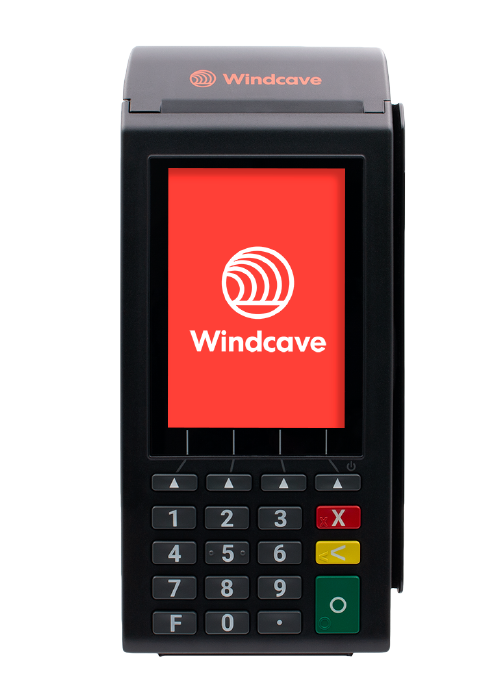
He hototahi ki nga kapeka Windcave EftPOS mo nga tauwhitinga ngaru utu kaari aunoa, kei reira te nui o te utu me te mana ka tukutahi aunoa.
Ma te kowhiringa waehere QR ka ngawari ki etahi atu kaihoko ki te matawai i te waehere i runga i to mata, ka oti te utu i runga i a raatau waea pūkoro, me te aunoatanga o te nui o te utu me te mana. Ka whakamahia pea tenei mo Polipay, Paypal me etahi atu otinga utu kaari ipurangi.
Ka taea e koe te whakamahi i etahi atu waahanga EftPOS, nga tikanga utu kore aunoa ranei. Me tuhi noa te mana utu me te tikanga utu i te otinga o te ota. Ko nga tikanga utu katoa ka taea te whakahoki ngawari ma te whakamahi i te ripoata houhanga.
I runga i te tikanga utu, ka taea ano e koe te whakauru i te nama kaari nama ki to kaitirotiro paetukutuku, ma te whai i te hononga kotahi ka whakamahia pea e te kaihoko. Mena kei te whakamahi koe i nga Utu Windcave, Worldine, PIN ranei, katahi ka waatea te puka kaari nama i roto i te POS me te kore e whakatere atu.
A he KOREUTU
Ko ta matou POS he tino KOREUTU me o maatau mahere manaaki tukutuku eCommerce katoa. Ko ia mahere manaaki kei raro i te tepe tauwhitinga, na me whiriwhiri he mahere manaaki e rite ana ki to rahinga tauwhitinga, utu iti noa ranei mo nga whakawhitinga i runga i to rohe. Ahakoa he aha, koinei te whirihoranga ngawari me te tino utu mo te hunga e hiahia ana ki te whakakotahitanga o te POS me nga hoko tuihono, me te whakahaerenga kararehe tukutahi.
Te Whakatutukitanga o te Ota
Ka taea e to roopu te whakataetae hokohoko tuihono me te tuku i nga taonga. Ka taea e to roopu te tuku tautoko waea ki nga kaihoko me nga ota kei te haere tonu. Ka taea e to roopu te timata i tetahi ota, ka tuku imeera ki te kaihoko ki te tirotiro me o raatau utu. He maha nga whiringa me te punaha whakauru katoa.
Ngā Tiwhikete i Tukutahitia
Ka taea te hoko i ngā tiikiti i roto i te toa, me te whakamahi ipurangi, ka hokona rānei i runga ipurangi ka whakamahia i roto i te toa, ka hokona rānei i runga i te grabone/treatme, ka whakamahia i hea noa atu, i tētahi atu huinga rānei. Ka whakahaerehia ngā tiikiti mai i te pātengi raraunga kotahi, ā, kotahi noa te whakamahinga o ngā tiikiti tau motuhake. Ka taea e koe te hoko atu ki ngā kaihoko i tētahi atu tiikiti he iti ake te moni mena kei te hiahia koe ki te hoatu moni whakahoki.
He iti te maha o ngā taonga.
Ka iti te maha o ngā taonga kei roto i ngā hua i te POS i mua i tō taenga atu ki te utu, kia taea ai e koe te tirotiro mēnā kei te kitea ngā taonga. Ahakoa pēhea, ka tirohia anōtia ngā ota katoa i te utu.
Whakahoki Taonga
Ka taea e koe te whakahoki taonga ma te whakakore i te ota taketake, a, ki te hiahiatia, katahi ka hanga he nama hou hei kape o te nama taketake, me nga mea i whakahokia mai kua mukua. Kei te mahi matou ki te whakatikatika i tenei mahi ki te whakatau i te houhanga utu.
Tohu Paepae Pae
Mena kāore āu waehere pae, ka taea e koe te whakaputa ngāwari mai i roto i tā mātou pūnaha. Me motuhake ngā waehere pae puta noa i tō whānuitanga hua. Mena he hokohoko rarawe koe, me whakarite kia motuhake ō waehere pae i roto i tō ahumahi, mā te tiki GTIN (tau taonga hokohoko ao).
He pai ake kia kaua e whakamahia ngā kupu whakataki 0 ki ō paewaehere, nā te mea ka tangohia pea e ngā pūmanawa pēnei i a Excel ngā 0 kei mua, me te whakaaro he tau noa iho. He pai ake kia kaua e whakamahia ngā waehere maha, nā te mea he maha ngā paewaehere ka puta, ā, he uaua ake pea te matawai.
Ko te tikanga, ka taea e koe te whakamahi i tētahi pūreretā tapanga hei tā i ō paewaehere. Me whakamahi pea koe i tētahi pūmanawa motuhake hei whakauru i ō paewaehere ki ngā tapanga kua whiriwhiria e koe. Kāore mātou e whakarato i tētahi tautoko motuhake mō te tā i ngā paewaehere, nō reira tēnā whakapā atu ki tō kaihanga pūreretā, ki tō kaiwhakarato pūmanawa motuhake rānei. Ko ētahi i tūtohutia pūmanawa tā barcode konei.
