
Website Worldの統合POSシステムを使えば、ショールームの管理や電話注文の受付が簡単になります。ショールームやコールセンターに必要なのは、インターネットに接続されたパソコンやiPadなどのデバイスだけです。
POSビデオデモ
すべてのデバイスをサポート
あらゆるタブレットとパソコンに対応しています。Android、Apple、Microsoftなど、どんな機種でも対応可能です。インターネットに接続されたWebブラウザがあれば、当社のPOSをご利用いただけます。
在庫同期
すべてのオンライン販売とPOS注文は、インターネットに接続された同一のデータベースを介してリアルタイムで処理されるため、在庫レベルは常に適切に管理されます。同期が必要なサードパーティシステムや、バッチ処理の問題もありません。
ユーザー数無制限
POSシステムは、複数のデバイスで無制限にインスタンスを作成でき、スタッフのアクティビティも追跡できます。すべてのPOSインスタンスは同じ注文履歴にアクセスできます。
あらゆるプリンターを使用可能
お使いのデバイスと互換性のある標準プリンターでご利用いただけます。請求書/領収書は、他のWebページと同じように印刷できます。または、お客様にメールアドレスを尋ねていただければ、メールで請求書を受け取ることも可能です。
任意のバーコードリーダーを使用
お使いのデバイスと互換性のある標準的なバーコードリーダーでご利用いただけます。バーコードを読み取って検索バーに入力すると、商品ページに直接移動し、カートに商品を追加できます。ワイヤレススキャナーをご利用の場合は、パソコンまたはデバイスの設定手順に従ってください。バーコードスキャナーは、カタログマネージャーのフィールドにコードを挿入するのにも使用できます。
使いやすい
使い方はとても簡単で、商品の「購入」ボタンをタッチまたはクリックしてカートに追加するだけです。注文を完了したら、高速キャッシュセールチェックアウトを使用するか、既存の顧客をリンクするか、新しい顧客の詳細を入力します。
支払いオプション
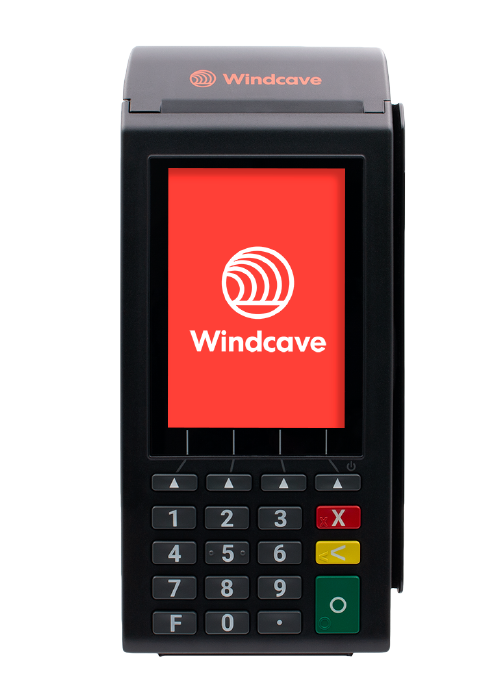
Windcave EftPOS 端末と互換性があり、カード ペイウェーブ取引が完全に自動化され、支払い金額とステータスが自動的に同期されます。
QRコードオプションを使用すると、他の顧客が画面上のコードをスキャンして、スマートフォンで支払いを完了できます。支払い金額とステータスは完全に自動化されています。これは、Polipay、PayPal、その他のオンラインカード決済ソリューションで使用できます。
他のEftPOS端末や非自動決済手段もご利用いただけます。注文完了時に、決済状況と決済方法を記録するだけで済みます。すべての決済方法は、決済照合レポートを使用して簡単に照合できます。
お支払い方法によっては、お客様が使用するのと同じリンクをクリックして、ウェブブラウザにクレジットカード番号を入力することもできます。Windcave、Worldine、またはPIN決済をご利用の場合は、POS端末内でクレジットカード入力フォームにアクセスでき、他の端末に移動する必要はありません。
そして無料です
当社のPOS機能は、すべてのeコマースウェブホスティングプランに完全無料でバンドルされています。各ホスティングプランにはトランザクション制限が設定されているため、取引量に合ったホスティングプランをお選びいただくか、制限を超えたトランザクションに対して少額の手数料をお支払いいただくだけでご利用いただけます。いずれにしても、POSとオンライン販売を組み合わせ、在庫管理を同期させたいお客様にとって、これは最もシンプルで手頃な価格の構成となるでしょう。
注文履行
チームはオンライン販売に対応し、商品を発送できます。注文中のお客様には電話でサポートを提供できます。注文を開始し、お客様にメールで通知してお支払い手続きを進めてもらうこともできます。完全に統合されたシステムで、多様なオプションをご利用いただけます。
バウチャー同期
バウチャーは、店舗で販売してオンラインで使用することも、オンラインで販売して店舗で使用することも、grabone/treatmeで販売してどこでも使用することも、あるいはその組み合わせも可能です。バウチャーは同じデータベースに基づいて管理され、固有の番号が付与されたバウチャーは1回のみ使用できます。お釣りを返したい場合は、より低い額面のバウチャーをお客様に販売することもできます。
在庫数が少ない。
レジに進む前でも、POSレジに商品の在庫数が少なく表示されるため、商品が確実に見つかるかご確認いただけます。いずれの場合も、すべてのご注文はレジで二重チェックされます。
返品について
元の注文をキャンセルすることで商品を返品できます。必要に応じて、元の請求書のコピーから返品された商品を削除した新しい請求書を作成してください。支払い調整に対応するため、この手順を微調整中です。
バーコードのヒント
既存のバーコードをお持ちでない場合は、当社のシステムから簡単に生成できます。バーコードは商品ラインナップ全体で一意である必要があります。卸売業の場合は、GTIN(国際取引商品番号)を取得して、業界内でバーコードが一意であることを確認する必要があります。
バーコードに0のプレフィックスを付けるのは避けた方が良いでしょう。Excelなどのソフトウェアは、先頭の0を通常の数字と誤認して削除してしまう可能性があります。また、veryコードも使用しない方が良いでしょう。veryコードはバーコードの幅が広くなり、スキャンが難しくなる可能性があるためです。
一般的に、どのラベルプリンターでもバーコードを印刷できます。ただし、選択したラベルにバーコードを印刷するには、専用のソフトウェアが必要になる場合があります。バーコード印刷に関する具体的なサポートは提供しておりませんので、プリンターメーカーまたは独立系ソフトウェアプロバイダーにお問い合わせください。 バーコード印刷ソフトウェアはこちら.
