
Website World 的集成式销售点系统让您轻松管理展厅或接听电话订单。您只需在展厅或呼叫中心配备一台联网设备,例如电脑或 iPad。
POS机视频演示
支持所有设备
我们支持所有平板电脑和电脑。无论是安卓、苹果、微软,还是其他任何系统……只要它有联网浏览器,就可以使用我们的POS系统。
库存同步
库存水平得到有效控制,所有线上销售和POS订单均通过同一个联网数据库实时处理。无需第三方系统同步,也不存在批量处理问题。
用户数量不限
您可以在不同设备上安装无限数量的POS系统实例,并且系统会跟踪员工操作。所有POS系统实例均可访问相同的订单历史记录。
使用任何打印机
可与任何兼容您设备的标准打印机配合使用。发票/收据的打印方式与打印其他网页相同。或者,您也可以直接向客户索取电子邮件地址,客户即可通过电子邮件接收发票。
使用任何条形码阅读器。
可与任何兼容您设备的标准条形码阅读器配合使用。读取条形码后,将其输入搜索栏,即可直接跳转至产品页面,将商品添加到购物车。如果您使用无线扫描器,请按照说明将其与您的计算机或设备进行配置。条形码扫描器还可用于将代码插入我们产品目录管理器的相应字段。
便于使用
使用起来非常简单,只需触摸或点击商品上的“购买”按钮即可将其添加到购物车,完成订单后,您可以选择快速现金结账、关联现有客户或输入新客户详细信息。
付款方式
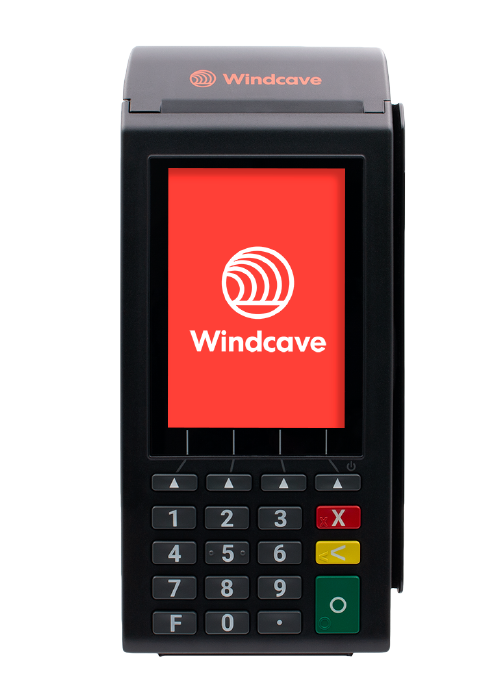
兼容 Windcave EftPOS 终端,可实现全自动刷卡支付交易,支付金额和状态自动同步。
二维码支付方式让其他顾客可以轻松扫描屏幕上的二维码,然后通过手机完成支付,支付金额和状态信息均可自动显示。此功能可用于支付宝、PayPal 或任何其他在线银行卡支付平台。
您可以使用其他电子转账终端(EftPOS)或非自动支付方式。只需在订单完成后记录支付状态和支付方式即可。所有支付方式均可使用对账报告轻松进行核对。
根据支付方式的不同,您也可以通过与客户相同的链接,在浏览器中输入信用卡号。如果您使用的是 Windcave、Worldine 或 PIN Payments,则无需离开当前页面,即可在 POS 系统中直接填写信用卡信息。
而且它是免费的
我们的POS系统与所有电商网站托管方案完全免费捆绑。每个托管方案都有交易量限制,因此请选择与您的交易量相匹配的方案,或者为超出限制的交易支付少量费用。无论如何,对于那些希望将POS系统与在线销售相结合,并实现库存同步管理的用户来说,这将是最简单、最经济的配置。
订单履行
您的团队可以处理线上销售和发货。您的团队可以为正在处理订单的客户提供电话支持。您的团队可以创建订单,并通过电子邮件发送给客户,方便他们完成付款。如此丰富的功能,尽在一个完全集成的系统中。
优惠券已同步
代金券可以在实体店销售并在线使用,也可以在线销售并在实体店使用,或者在 Grabone/Treatme 等平台销售并在任何地方使用,或者以任何类似组合方式使用。所有代金券都使用同一个数据库,每个带有唯一编号的代金券只能使用一次。如果您想找零,可以向顾客出售面额较低的代金券。
库存量低。
即使在您结账之前,POS系统中也会显示商品库存较低,以便您确认是否能找到所需商品。无论如何,所有订单在结账时都会进行二次核对。
退货
您可以通过取消原订单来退货,如有需要,可以创建一个新发票,副本与原发票相同,并将退货商品删除。我们正在优化此步骤,以更好地处理付款对账。
条形码使用技巧
如果您还没有条形码,您可以轻松地在我们的系统中生成。条形码在您的所有产品中应该是唯一的。如果您是批发商,则应通过申请 GTIN(全球贸易项目代码)来确保您的条形码在行业内是唯一的。
条形码最好不要使用 0 前缀,因为像 Excel 这样的软件可能会将其识别为普通数字,并删除前面的 0。此外,最好不要使用非常宽的条形码,因为它们生成的条形码较宽,可能难以扫描。
通常情况下,您可以使用任何标签打印机来打印条形码。您可能需要使用专用软件来调整条形码,使其适应您选择的标签。我们不提供任何关于条形码打印的具体支持,因此请咨询您的打印机制造商或独立的软件提供商。一些建议 这里提供条码打印软件.
