

Hi [FIRSTNAME]

This edition of website.world news is dedicated to Mobile Responsive Websites.
- All about Mobile Responsive Websites.
- Our Most Popular Theme: Minimal
- How to upgrade to a mobile responsive template
- New dedicated mobile template layouts
- Tips on Mobile Responsive Content
- Tweaking your CSS to be Mobile Responsive.
- August Promotion: Win $4500 Busines Makeover Package
- Awesome Updates and New Features
- Professional mobile website upgrade - only $100
- 100% Up Time
- Need training?
- Clearing your browser cache
- Better Broadband & 0800 telephone numbers
- 25% discount on hosting
- Start your own business - reseller options
- Cool links/system links
- Websites of the month
All about Mobile Responsive and Dedicated Mobile Websites
There are a few different ways to make your website more awesome for mobile users
- 専用モバイルウェブサイトテンプレート
- Responsive Mobile Website Template
- 完全に独立したモバイルウェブサイト
専用モバイルウェブサイトテンプレート
A dedicated mobile website template is the traditional way we have provided backward compatibility for all our desktop website templates to offer your customers a better mobile experience. The mobile template uses the same navigational sitemap, and same content as your desktop website. However, we trimmed off all the unnecessary clutter to ensure your customers could quickly get to the information they want. For example, navigate to your contact details, view a map link, or view your products and make a purchase easily on their small screens. Over time we have added banners, logos and auto matched the colours to your desktop template. With fine tuning to your dedicated mobile template design, your customers will have an awesome experience, as this method is the最速のオプション for customers using slow rural mobile connections. Dedicated mobile templates are usually 3 times faster to load than a responsive template, and 10 times faster than the average WordPress template.
レスポンシブモバイルウェブサイトテンプレート
Responsive templates are a popular approach in the web design industry, because not every CMS can provide a dedicated mobile template option. Responsive design means that the template has been specially crafted to change shape in different browser widths. Responsive templates can be difficult for users to edit themselves, as each element needs to be especially crafted. For example, menus might be condensed, or relocated off page, and pulled in when needed. Responsive websites tend to be slower to download on mobile devices, as the mobile device needs to download all the styles/themes that are used in the desktop version, even if not used in the mobile version. Some web designers focus on making great looking templates, but they forget about these download speed issues. If your website is tourist oriented, your customers may be out and about on the edges of mobile phone coverage, and they might have trouble downloading all the additional JavaScript and CSS libraries that are not required for the mobile experience. Responsive templates are often slow to download, but we have been working hard to make our new responsive templates as fast as they can be, and our responsive templates will render about 3 times faster than the average WordPress theme. Our responsive websites can be customised with different colours, fonts, and images.
完全に独立したモバイルウェブサイト
ウェブサイト全体をモバイル専用に構築すると、最初は非常に優れたモバイルエクスペリエンスを実現できるかもしれませんが、多くの場合、ウェブマスターがメンテナンスを怠ったり(あるいはメンテナンスできなくなったり)、各ウェブサイトの情報が同期されなくなることがあります。オンラインショッピングサイトを運営している場合は、モバイルエクスペリエンスとデスクトップエクスペリエンスの両方を同じショッピングカートエンジンで実現する必要があります。そのため、このアプローチはお勧めしません。
最も人気のあるテーマ
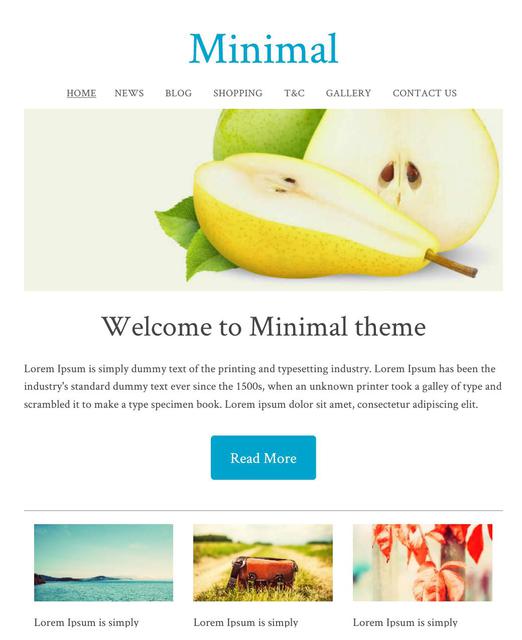
The minimal template range is currently the most popular theme selected by our users. With a simple white background, and a big beautiful images, you can create a great looking website, and choose your own fonts and colours for the text, headings, and buttons.
最小限のテンプレート ID: 114657 は、専用のモバイル モードでもレスポンシブ モードでもほぼ同じ外観になります。
All New Responsive Templates
We have upgraded lots of our old templates to be all new responsive templates, wide on big screens, just right on small screens, and fast and beautiful on the smallest of mobile screens. These are available under the dedicated "Responsive" tab.
当社のレスポンシブ テンプレートは、お客様によってカスタマイズできます。
- アニメーションバナー
- ロゴまたは会社名
- 背景画像、色、またはテクスチャ
- すべての色を選択可能
- カスタムフォント、サイズ、行間隔
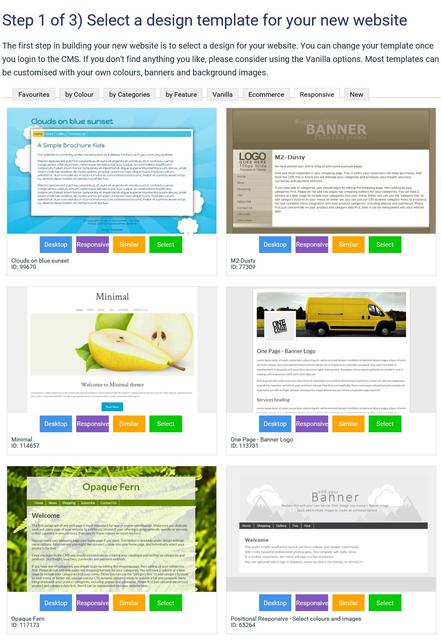
既存のウェブサイトをレスポンシブテンプレートに変換する方法
豊富なレスポンシブテンプレートをご用意しており、お選びいただけます。テンプレートは常に更新されています。レスポンシブテンプレートに変更すると、デスクトップとモバイルの両方のレイアウトが更新されます。
- CMSでデザインタブに移動します
- テーマの変更を選択
- すべてのテーマをご覧になり、「レスポンシブ」または「モバイル」ボタンに注目してください。このボタンをクリックすると、どちらのモードでもテーマをプレビューできます。レスポンシブボタンがあるテーマのみがレスポンシブテンプレートです。
- 続行するにはテーマを選択してください。
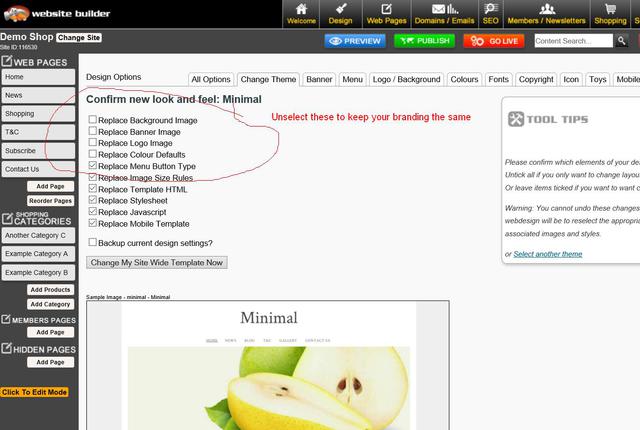
- 既存のブランド要素をそのままにしたい場合は、バナー、ロゴ、背景、色を変更するためのボックスのチェックを外します。
- 万が一問題が発生した場合に備えて、古いデザイン設定をバックアップするには、ボックスにチェックを入れてください。
- テーマの変更を保存します。
- テーマ変更後にウェブサイトをプレビューすると、ブラウザのキャッシュ設定により正しく表示されない場合があります。ウェブサイトが正しく表示されるようにするには、「公開」してブラウザのキャッシュをクリアする必要があるかもしれません。
- テンプレートによってはデフォルトの色が用意されているものもあれば、用意されていないものもあるため、メニューなどの色設定を再度適用する必要がある場合があります。また、色の組み合わせがテンプレートとすぐには互換性がなく、微調整が必要になる場合もあります。
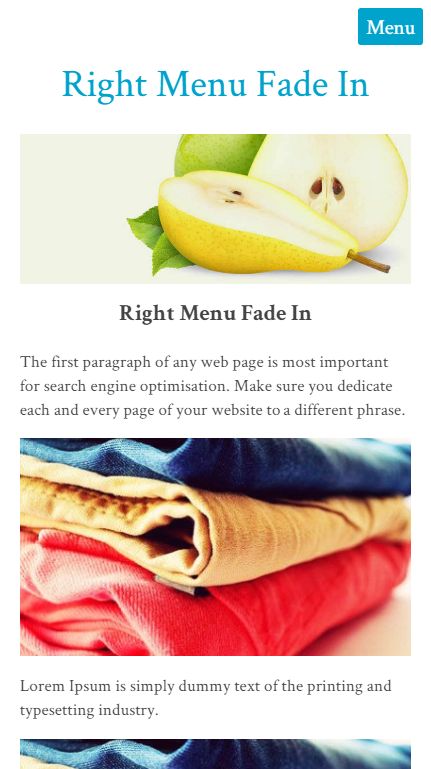
Dedicated Mobile Option - New Templates
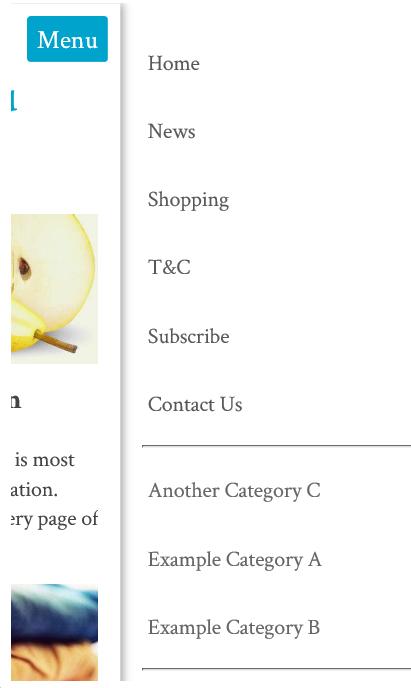
The minimal template is one of our most popular, and it has a responsive look that many like. We have also added the same look to our dedicated mobile themes. It has a menu that fades in from the right when you press the MENU button.
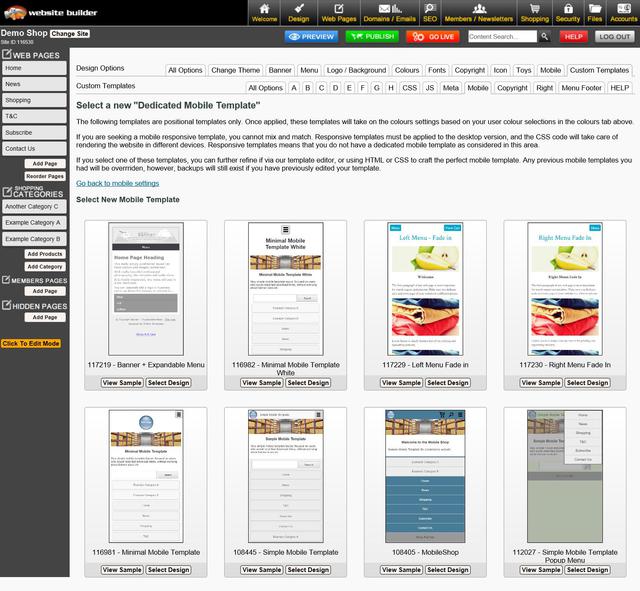
新しい専用モバイルテンプレートの選択方法
専用のモバイル テンプレートが 8 種類ありますが、それぞれデスクトップ テーマの色とフォントが使用されます。
- CMSでデザインタブに移動します
- モバイルテンプレートを選択
- 新しいモバイルテーマを選択をクリック
- すべてのテーマをご覧になり、「レスポンシブ」または「モバイル」ボタンに注目してください。このボタンをクリックすると、どちらのモードでもテーマをプレビューできます。レスポンシブボタンがあるテーマのみがレスポンシブテンプレートです。
- 続行するにはテーマを選択してください。
- 既存のブランド要素をそのままにしたい場合は、バナー、ロゴ、背景、色を変更するためのボックスのチェックを外します。
- 万が一問題が発生した場合に備えて、古いデザイン設定をバックアップするには、ボックスにチェックを入れてください。
- テーマの変更を保存します。
- テーマ変更後にウェブサイトをプレビューすると、ブラウザのキャッシュ設定により正しく表示されない場合があります。ウェブサイトが正しく表示されるようにするには、「公開」してブラウザのキャッシュをクリアする必要があるかもしれません。
- テンプレートによってはデフォルトの色が用意されているものもあれば、用意されていないものもあるため、メニューなどの色設定を再度適用する必要がある場合があります。また、色の組み合わせがテンプレートとすぐには互換性がなく、微調整が必要になる場合もあります。
モバイルレスポンシブコンテンツのヒント
モバイルデバイスで最高のユーザーエクスペリエンスを実現するには、コンテンツもモバイルレスポンシブに対応する必要があります。多くのお客様は、画像やテキストを配置するために、行と列を多く含む複雑な表構造を作成するために、従来のTinyMCEエディタモードを使用してきました。このようなレイアウトは、画面幅の狭い画面に自動的に調整されず、コンテンツの一部が欠けたり、スクロールバーを使ってアクセスする必要が生じたりします。
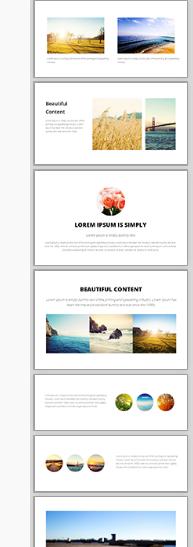
美しくレスポンシブなコンテンツを作成するための最高のコンテンツエディタは、新しいドラッグ&ドロップエディタです。右側にスニペットが表示されています。これらのスニペットをコンテンツエリアにドラッグ&ドロップし、テキスト、画像、リンクを編集してください。
これらの表示ウィジェットは、狭い画面上では美しいスタックレイアウトに自動的に調整する方法をすでに知っています。
一般的なレスポンシブコンテンツ
All of our system generated content has recently been optimised for mobile responsive layouts by default, avoiding the need to specifically optimize each template individually. This includes:
- ポップアップスライドショー 最大幅95%
- ショッピングカートとチェックアウトページ
- お問い合わせフォーム
- 会員登録フォーム
レスポンシブなモバイル テンプレートで適切に表示されないシステム生成コンテンツが見つかった場合は、お知らせください。できるだけ早く修正いたします。
CSS を微調整してモバイル レスポンシブにする
If you are technically minded, you might like to just hack your existing template into CSS responsive mode without breaking everything else that has been especially crafted.
スタイルシート内で、最大寸法が 600 ピクセル、750 ピクセル、または 900 ピクセルの行を探します。
#コンテナ { 幅: 750px; マージン: 0 自動; }
そして、これを次のように変更すると、画面幅の 90% が最大 960 まで満たされます。
#container { width: 90%; max-width: 960px; margin: 5% auto; }
次に、列を探し、幅または余白を固定幅から%幅に変更します。ただし、画面幅がサポートしている場合のみ、これらの幅を適用します。画面幅が600px未満の場合、列はブラウザの幅いっぱいに重ねて表示されます。
@media (最小幅: 600px) { .leftColumn { 幅: 20%; フロート: 左; }
Promotion:
Last day - ends tomorow:
We've joined up with 11 other service providers to bring you this AMAZING GIVEAWAY worth $4500!!

Awesome Updates and New Features
- Directory Widget - Now has 5 categories per listing
- Photo Shopping Cart - you can now search for photos by keyword or private gallery code.
- Most 3 and 4 column thumbnail layouts have been upgraded to 320x320 sized thumbnails. Higher quality images do increase the download time and traffic, but look better on our new wider format templates
- New training videos

Professional Mobile Upgrade
Only $100+gst
Professional mobile upgrade service. (RRP: $299)
Need Professional Help For To Make Your Existing Website Mobile Responsive?
It's possible you may break some elements of your website if you attempt to change the template on a live website.
Our in house web designers are keen to help you update your old website to a modern new responsive look. Normally we would charge $250 for that sort of upgrade. If you go ahead before end of August, we will do your mobile upgrade for just $100+gst

100% Website Up Time
We have returned to our 100% up time winning streak, after the outage in June destroyed our year long march in the 100% zone. June was a low 99.85% up time due to that big Sydney storm.
Over the last 2 months we have performed many system upgrades to make our hosting service more robust and deal more gracefully with outages in specific geographical locations.
Uptime stats provided by Pingdom.com
Need one-on-one Website Builder Training?
If you require personalised training, please contact one of our consultants, who are based all over. Several consultants also provide over the phone and web based training at a scheduled time.
We would encourage all customers to get at least one hour of training at the early stages of building their website, and one more review prior to going live, just to give your website that professional critique, and quick tidy up of the rough bits.
Training topics include:
-
How to use website builder and shopping cart
-
How to design websites
-
How to crop and tidy up photos
-
How to optimise to get your website higher on google and other search engines
-
How to setup a facebook page, or other social media account
-
How to send newsletters
-
How to use any other feature we offer.
Clearing your Browser Cache and Publishing
Caching speeds up your computer, but it also causes confusion when viewing changes to your website. Every web master needs to become familiar with this concept. Almost a third of all our support tickets relate to mis understandings about caching. We can't change the nature of the internet, we only educate.
- Pressing publish button is neccesary even before you go live. Pressing the publish button allows you to navigate your trial website. When you navigate your trial website, you are actually navigating the published pages in many cases. Only the first page to preview in preview mode usually shows your recent changes.
- Your web browser is not aware that you are currently editing your website. The web browser does not undersstand any connection between our website builder CMS, and your website with a completely different URL. You typically need to press REFRESH on your browser to see recent updates. Or you may even need to clear your browser cache.
All New Training Videos
Andrew has been busy making some awesome new training videos, to show you just how easy it is to do some amazing things. If you want him to make more great videos, please email support telling him what a great job he's doing, and what you would like to know more about.

Better Broadband (NZ Customers)
We have teamed up with the awesome ISP's to offer you some great broadband options. If you have become disgruntled with your current isp, now is the time to get a great bundled broadband offering, including the following ISPs
- MyRepublic
- 2Talk
- BigPipe
https://www.websitebuilder.world/listing/nz-broadband-providers
0800 Numbers and Cheaper Tolls (NZ Customers)
Do you need an 0800 number for your business? We think 2talk provide a really awesome service, and it's who we use. For example, you have an 0800 number call your landline first, then your mobile, then your 2IC's mobile to ensure that somone will take the call. Their rates are cheap, and all the value added services can be managed via a web page control panel, so you don't need to wait on hold for any call centers. You can manage your lines fully yourself.

Receive a 25% discount off your web hosting, for life, by referring a friend
Did you know that if you refer a friend to use our awesome website builder service, you get a 25% discount off your hosting? If you refer 4 friends, then you will essentially get your web hosting for free! Not only that, but your friends will also get their 2nd month web hosting absolutely free. That's a nice little encouragement for them to check our service out and gives us the opportunity to setup your discount. Both discounts apply for your 2nd and subsequent websites also. It doesn't matter if it is yours, a friend, family or a stranger. Discounts begin once both websites are live. Please make sure you or your friend communicates the referral at the earliest opportunity.
再販業者オプション
We have an awesome new offer for web designers and awesome business networkers. We can setup any web designer who is interested with all they need to get started as a web designer at no cost:
- There are no setup fees, no contracts to sign.
- You will earn $2+ on every domain name sold (based on RRP $19 per year).
- You will earn (25%-50%) commission on hosting
- You can manage all your customers content, domains, emails etc, easily from just 1 login.
- We take care of all the billing arrangements, so no administrative hassle.
Need Help! is at hand...
There are several places you can find answers to questions about how to build your website and add features (which, there are a lot of) and its free for you to look:
If you can't find the answer you need - then get you can Contact - Web Designers or lodge a Support ticket
Cool links
- http://www.wikihow.com/Clear-Your-Browser's-Cache - Clear your browser cache
-
http://word2cleanhtml.com - Cleans word docs for CMS Editor
-
GoogleFonts - Online Web Fonts
-
http://pinterest.com/ - A social networking Pin Board
-
http://pixlr.com/ - online photo editor
-
http://www.photoshop.com - online photo editor
-
http://www.jotform.com/ - online form builder
-
www.needanerd.co.nz - NZ Wide IT Nerds
-
www.geeksonwheels.co.nz - NZ Wide IT Geeks
-
https://www.pexels.com/ - Free Stock Photos
-
www.ninite.com - absolutely the best way to install new software on a new computer
-
www.2talk.co.nz - cheaper VOIP calling and 0800 incoming call routing
All those links and more at our new toolbox page:
Websites of the month
Here's a selection of some of our recent Go Lives.
- http://www.teamtees.org.nz
- http://www.epicdota.com
- http://www.thebedstore.co.nz/
- http://www.TrueWesternWear.nz
- http://www.myfastcash.co.nz
- http://www.nzspp.co.nz
- http://www.H2OBlastingChristchurch.co.nz
- http://www.codexedit.com
- http://www.maternitysupportandeducation.co.nz
- http://www.alphamews.co.nz
- http://www.gideonsnz.org
- http://www.lahmanenergy.co.nz
- http://www.poolcaretech.co.nz
- http://www.furnacc.com
- http://www.myersecology.kiwi
- http://www.veaimagesolutions.co.nz
- http://www.rcparts.co.nz
- http://www.donsdiscounttyres.co.nz
- http://www.rjsscaffoldhire.co.nz
- http://www.asiltd.co.nz
- http://www.karatefudokan.co.nz
- http://www.silversky.co.nz
- http://www.webworkx.co.nz
- http://www.summitlodge.co.nz
- http://www.letsgoparty.co.nz
- http://www.standingtrialpopulations.nz
- http://www.rainbowfish.co.nz
Please お問い合わせ for more information.
From the Team @ Web Widgets Ltd
Website World - Free Website Builder
Posted: Mon 15 Aug 2016
